Roles and Permissions in SSP Enterprise
The question that decides whether shared custody actually works is not "who is in charge?" It is "who can move the money?" — and in a well-built system those are different questions with different answers.
SSP Enterprise answers them in two separate places. Administrative authority lives in the organisation's records, where it can be granted and revoked like any other permission. Spending authority lives in the vault address, where it cannot. This article is the full map of both, including the cases where people are most often surprised.
If you have not read the overview of how organisations and vaults fit together, SSP Enterprise: multisig vaults for teams is the piece before this one.
Two systems, deliberately
An organisation role governs the workspace: inviting people, creating vaults, changing settings, reading the audit log. It is a database record. Change it and the change takes effect immediately.
A vault role governs one specific vault, and one of its three values — signer — means your public key is part of how that vault's address was derived. That cannot be changed by editing anything. It can only be changed by creating a different vault at a different address and moving the funds.
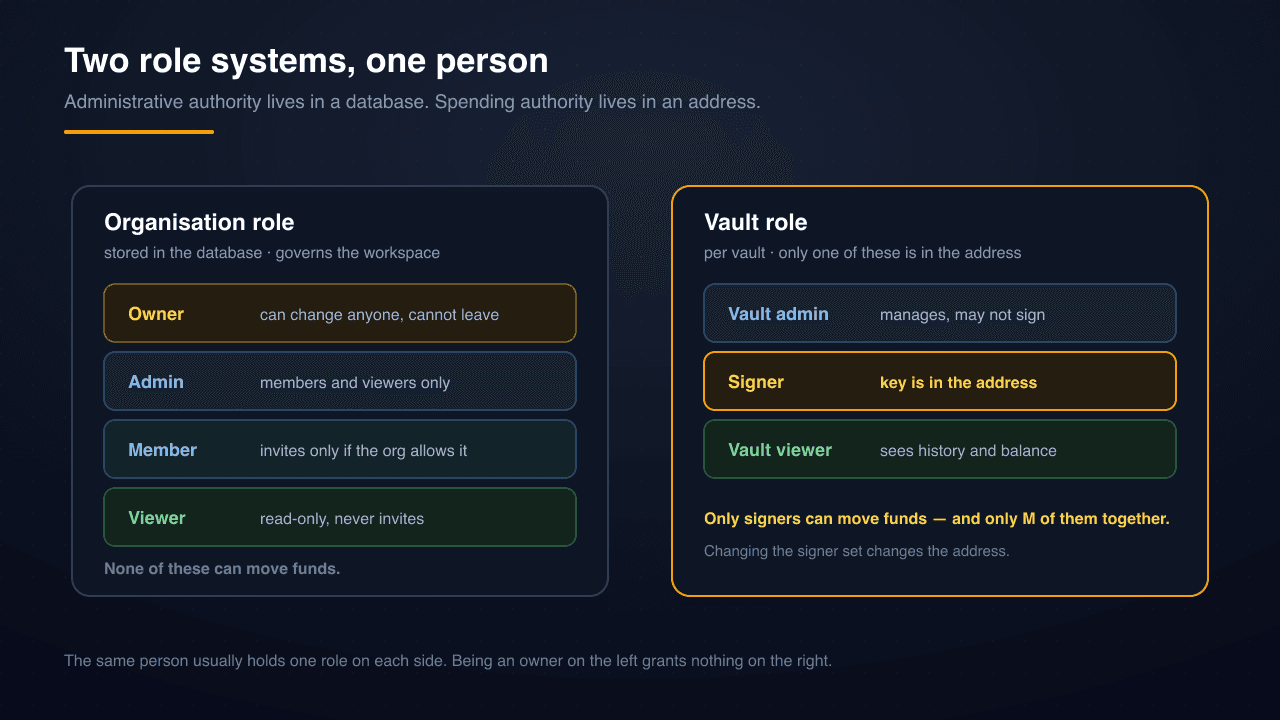
The practical upshot, and the single most important sentence in this article: an organisation owner who is not a signer on a vault cannot spend from that vault. Not with dashboard access, not with database access, not with SSP's cooperation. The address does not know what an owner is.
Organisation roles, precisely
Four roles, strictly ranked.
| Capability | Owner | Admin | Member | Viewer |
|---|---|---|---|---|
| Read vaults, activity, audit log | Yes | Yes | Yes | Yes |
| Invite new people | Yes | Yes | Only if the org allows it | No |
| Change a member's or viewer's role | Yes | Yes | No | No |
| Change another admin's role | Yes | No | No | No |
| Change organisation settings | Yes | Yes | No | No |
| Transfer ownership, delete the organisation | Yes | No | No | No |
| Leave the organisation | No — transfer first | Yes | Yes | Yes |
Three details in that table are worth pulling out.
Admins cannot touch other admins. An admin can promote, demote and remove members and viewers, but the moment the target is another admin the operation is refused. This is deliberate: it means a single compromised admin account cannot quietly dismantle the rest of the administrative layer.
Member invites are an organisation-level switch. By default, inviting is an admin capability. An organisation can opt to let members invite too — useful for larger teams where onboarding shouldn't queue behind two people, and worth leaving off if you want a tight perimeter.
The owner cannot leave. There is exactly one owner, and the exit is transferring ownership to someone else first. This prevents the failure mode where an organisation ends up with nobody able to perform owner-only operations.
Vault roles, precisely
Three roles, and they are scoped to a single vault rather than the organisation.
A vault admin manages the vault: its policies, its notification settings, its viewers. A vault admin is not necessarily a signer, and a vault admin who is not a signer cannot approve a proposal.
A signer holds one of the keys in the vault's M-of-N. Signers draft proposals and approve them. Their public key is in the address.
A vault viewer sees balances, proposals and history without being able to draft or approve anything. Useful for auditors, accountants, and anyone who needs visibility without authority.
Because vault roles are per-vault, one person can be a signer on the operations vault and only a viewer on the treasury vault. That is a normal and healthy arrangement: it lets you give day-to-day spending authority to the people who need it while keeping the reserve behind a different, smaller committee.
Invitations go to identities, not inboxes
An invitation in SSP Enterprise is addressed to a WK identity — the 2-of-2 multisig identity derived from someone's SSP Wallet and SSP Key — rather than to an email address.
This is a security property rather than an inconvenience. An email address can be compromised, forwarded, or typo'd into someone else's hands. A WK identity can only be presented by someone holding both of that person's devices, which means an invitation cannot be accepted by whoever happens to read the message.
Two consequences follow. First, the person you are inviting needs an SSP setup before they can join; there is no "sign up from the invite email" path, by design. Second, invitations are auditable in a way email invitations are not, because acceptance is a signed act.
Expired invitations are not deleted. They are kept indefinitely, because "who was invited and never joined" is exactly the sort of question an audit asks months later. Nothing in the audit trail has a time-to-live.
What requires re-signing
Some operations are too consequential to authorise with a session cookie. Thirteen of them require you to re-sign with both of your devices at the moment you act, including:
- Transferring ownership of an organisation
- Deleting an organisation
- Removing a member
- Changing the enterprise email on an account
The mechanic matters here. The server generates the challenge to be signed — never the client — and the challenge is bound to the specific action, the specific target, and a timestamp. A signature captured from one operation cannot be replayed into another.
Every attempt is logged permanently, including the failures. A pattern of failed critical-action attempts is itself a signal worth having on record.
Where role changes get recorded
Every permission change is written to the organisation's audit log: role grants and revocations, invitations issued, accepted, rejected and revoked, members joining and leaving, removals, and ownership transfers. Vault-level changes get their own events — signers and viewers added or removed, policy edits, vault status changes.
Audit records are permanent. There is no expiry and no cleanup job, because the value of an audit trail lies entirely in the parts nobody anticipated needing. An organisation that discovers a problem in November wants the record from March.
Designing your role layout
A few patterns that hold up in practice.
Separate the administrator from the signers. Let an operations lead hold organisation admin so they can manage people and vault settings, without putting their key in the treasury address. Administrative convenience then carries no custody risk.
Give the finance function viewer roles generously. Read access is cheap and makes reconciliation possible without expanding the set of people who can spend. There is no reason for an accountant to be a signer.
Keep the treasury committee smaller than the operations committee. A 3-of-5 reserve and a 2-of-3 operational vault is a common and sensible split: the money you touch daily has a lower approval bar than the money you touch yearly. 2-of-2 vs 2-of-3 vs m-of-n covers how to reason about the numbers.
Decide the departure procedure before anyone departs. Removing someone from the organisation is a role change; removing them as a signer is a new vault and a fund migration. Write down which one you will do, and confirm the remaining signer set still clears the threshold. What happens if one of your keys is compromised walks the adjacent scenario.
Do not treat policies as permissions. Whitelists, time locks and approval rules shape what gets proposed, but the threshold is the only thing the chain enforces. Design your roles as though the policy engine did not exist, then add policies as process improvements on top.
The role hierarchy is easy to get right if you keep one question in the front of your mind: which of these changes require a new address, and which are just records? Everything in the organisation layer is a record. Only the signer set is an address.